![MicrosoftTeams-image (28).png]](https://27075283.hs-sites-eu1.com/hs-fs/hubfs/MicrosoftTeams-image%20(28).png?width=85&height=85&name=MicrosoftTeams-image%20(28).png)
This article explains how to remove a specific appointment from the TurnUp waiting list.
⚠️ Remarks
-
This procedure applies to practices with and without active synchronisation between TurnUp World and the DentAdmin environment.
-
Removing an appointment from the waiting list via DentAdmin is only possible once the TurnUp team has configured the communication matrix in DentAdmin in advance.
This enables the following actions:-
Add patient to the waiting list
-
Remove patient from the waiting list
-
Create a last-minute appointment
-
Cancel a last-minute appointment
-
-
Each appointment is added to the waiting list individually. This means a patient can have multiple appointments on the waiting list. Keep this in mind when removing one specific appointment.
📝Step-by-step guide
-
Open the agenda in DentAdmin
-
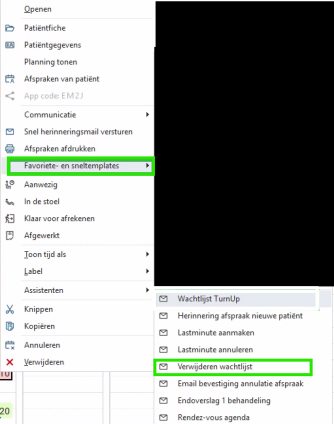
Right-click on the appointment you want to remove from the waiting list
-
Hover over Favourites and quick templates
-
Click Remove from waiting list
What are the consequences?
-
The selected patient appointment is removed from the waiting list.
-
For this specific appointment, the patient will no longer receive last-minute notifications.
-
The patient appears in the Unsubscribed module in the TurnUp application.