![MicrosoftTeams-image (28).png]](https://27075283.hs-sites-eu1.com/hs-fs/hubfs/MicrosoftTeams-image%20(28).png?width=85&height=85&name=MicrosoftTeams-image%20(28).png)
In the No-Show module, you can adjust the risk status for each appointment. This allows you to tailor the communication based on your practice’s own assessment.
🛡️ What does the risk status mean?
The risk status determines which communication flow is automatically triggered for an appointment.
TurnUp calculates a default risk score based on:
-
The appointment details
-
The patient’s history (via your PMS)
-
Multiple AI data points
There are two possible statuses and communication flows:
-
🔴 High risk → Intensive confirmation flow
-
🟢 Low risk → Lighter reminder flow
You can always adjust this status manually if needed.
Need a refresher on these communication flows? This article explains everything clearly.
🦷 When should you adjust the risk status?
Although TurnUp provides an automatic risk assessment, your practice knows the patient best.
Adjust the risk status when:
-
You feel additional follow-up is necessary
-
A usually reliable patient seems uncertain for a specific appointment
-
The treatment is important or time-intensive
Choose high risk if you want extra certainty and more intensive follow-up.
Choose low risk if standard reminders are sufficient.
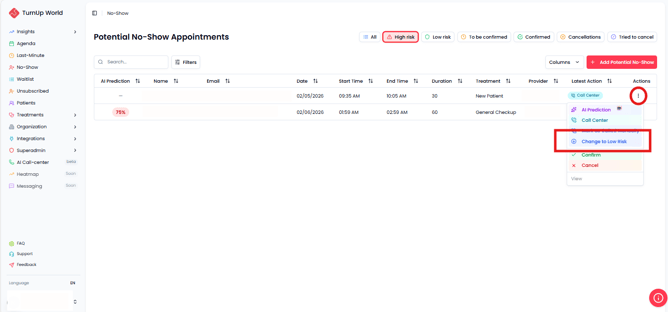
⚙️ How do you change the risk status?
Follow these steps:
-
Go to the No-Show module.
-
Find the appointment in the list.
-
Click on the appointment.
-
Select the desired risk status (high or low).
The communication flow is updated automatically.
✅ Why is this important for your practice?
By using the risk status strategically, you:
-
Target your communication more effectively
-
Save time on manual follow-up
-
Reduce no-shows
-
Increase the chance of a fully booked schedule
A correct risk assessment means fewer empty chairs and more control over your planning.