![MicrosoftTeams-image (28).png]](https://27075283.hs-sites-eu1.com/hs-fs/hubfs/MicrosoftTeams-image%20(28).png?width=85&height=85&name=MicrosoftTeams-image%20(28).png)
As a practice, you have the option to manually unsubscribe a patient from TurnUp notifications related to your practice. In this article, we explain how this works, what the consequences are, and what is important to know.
🔕 What does unsubscribing a patient mean?
When a patient is unsubscribed from TurnUp notifications, they will no longer receive communications from your practice via TurnUp, such as:
-
appointment reminders
-
last-minute invitations
-
other notifications or updates
This applies to email, SMS, and app notifications.
⚙️ How can I unsubscribe a patient as a practice?
You can unsubscribe a patient via the Patients page in TurnUp World:
-
Go to the Patients module
-
Search for the relevant patient
-
Click the three dots (⋯) under Actions
-
Select “Disable notifications”
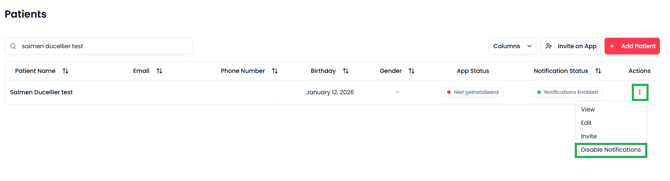
After this action, the patient will no longer receive TurnUp notifications from your practice.
On the patients list, a new column will appear: Notification status.
This allows you to immediately see whether a patient is active or unsubscribed from notifications.
🔄 Can I re-subscribe a patient?
When a patient has been unsubscribed from TurnUp notifications:
-
the practice cannot re-enable notifications itself
-
the patient cannot re-enable notifications independently
To reactivate notifications, TurnUp Support must be contacted.
ℹ️ Good to know
A patient can always unsubscribe themselves from TurnUp notifications related to your practice or from all practices they are registered with. More information on how patients can do this themselves can be found here.