![MicrosoftTeams-image (28).png]](https://27075283.hs-sites-eu1.com/hs-fs/hubfs/MicrosoftTeams-image%20(28).png?width=85&height=85&name=MicrosoftTeams-image%20(28).png)
In some cases, a patient confirms or cancels their appointment by phone, instead of using the messages, emails, or notifications sent by TurnUp.
In that situation, you need to manually update the appointment status in TurnUp to ensure the no-show follow-up remains correct.
When is manual action required?
For practices with a full synchronization between the PMS and TurnUp and with No-show follow-up enabled, appointments are normally handled automatically by TurnUp.
Manual action is required when:
-
a patient confirms or cancels by phone
-
the patient does not respond via SMS, email, or app
-
the front desk staff confirms the status during a phone call
How do you update the status of an appointment in TurnUp?
If a patient confirms or cancels their appointment by phone, follow these steps:
-
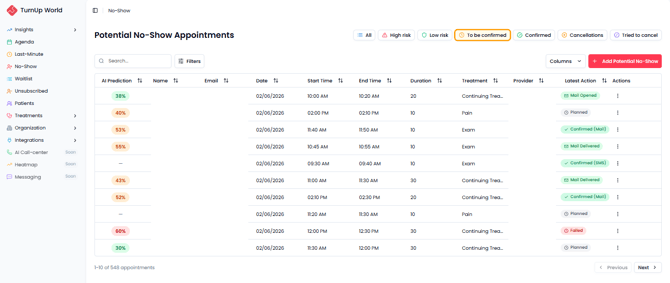
Go to the No-show module
-
Open the To be confirmed tab
-
Search for the appointment that was confirmed or cancelled by phone
-
Click the three dots next to the appointment
-
Select Confirm or Cancel
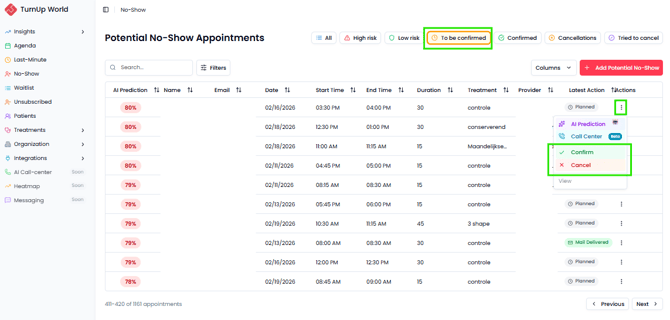
➡️ The appointment is automatically moved to the correct tab:
-
Confirmed when confirmed
-
Cancellations when cancelled