![MicrosoftTeams-image (28).png]](https://27075283.hs-sites-eu1.com/hs-fs/hubfs/MicrosoftTeams-image%20(28).png?width=85&height=85&name=MicrosoftTeams-image%20(28).png)
Why patients are removed from the waitlist
There are three main reasons why patients may no longer appear on your list:
- Appointment expiration: Once a patient's scheduled appointment time has passed, such as today at 11:00 am, they are automatically removed from the list.
- Self-unsubscribe: Patients have the ability to opt out themselves by clicking a button to be taken off the list.
- Front desk removal: The front desk staff also have the option to manually remove patients from the list.
Where can I see removed patients?
-
Open TurnUp World.
-
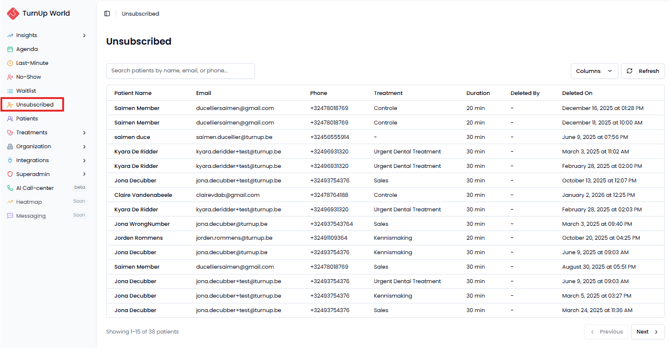
Navigate to the Unsubscribed module on the right side of the screen.
Here, you will find an overview of all patients who are no longer on your waitlist.
How to add a patient back to the waitlist
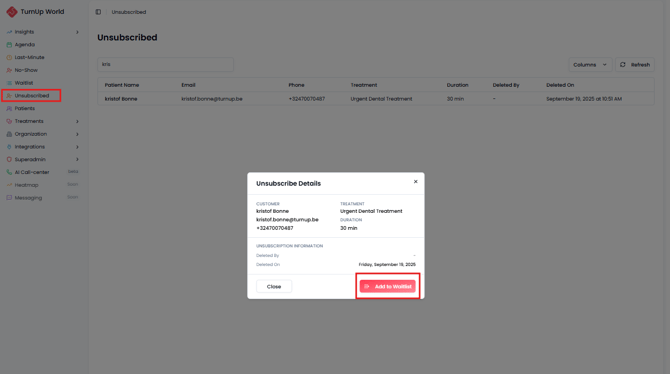
If a patient was removed from the waitlist by mistake, you can easily re-add them:
- Go to the Unsubscribed tab.
- Click on the patient you want to re-add.
- A pop-up window will open.
- Click Add to waitlist to place the patient back on the waitlist.