![MicrosoftTeams-image (28).png]](https://27075283.hs-sites-eu1.com/hs-fs/hubfs/MicrosoftTeams-image%20(28).png?width=85&height=85&name=MicrosoftTeams-image%20(28).png)
Has a patient unsubscribed from your waiting list and do you want to know where to find them?
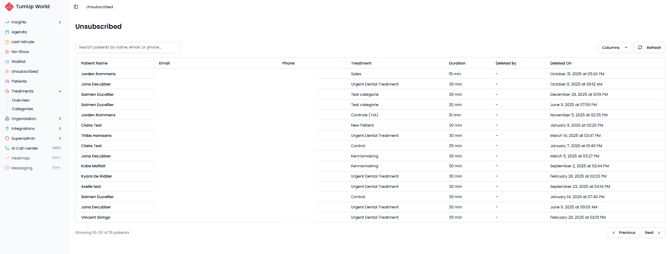
In TurnUp, you can find all unsubscribed patients in the “Unsubscribed” module.
👀 Where can you view unsubscribed patients?
Go to the Unsubscribed module in TurnUp.
There, you will find a complete overview of patients who are no longer on the waiting list.
A patient may be unsubscribed because:
-
They unsubscribed themselves via the “Unsubscribe” link in a TurnUp email.
-
The practice manually unsubscribed the patient at their request.
⚠️ Did you remove a patient by mistake?
This can easily be resolved.
-
In the Unsubscribed module, click on the patient’s name.
-
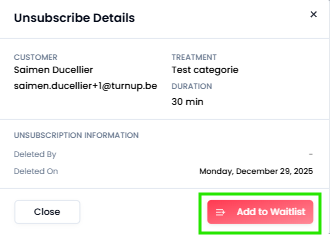
A small pop-up window will open.
-
Select the option to add the patient back to the waiting list.
The patient will immediately become active on the waiting list again.