![MicrosoftTeams-image (28).png]](https://27075283.hs-sites-eu1.com/hs-fs/hubfs/MicrosoftTeams-image%20(28).png?width=85&height=85&name=MicrosoftTeams-image%20(28).png)
With this recent update, you can assign user roles to staff members in TurnUp. This allows you to easily control who can see and manage specific parts of the application.
This results in more clarity, security, and control within your practice.
👤 Which user roles are available?
There are currently two user roles in TurnUp:
Administrator
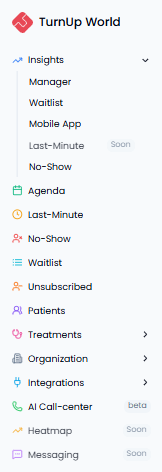
An administrator has full access to TurnUp and can view and manage all areas, including:
-
All modules
-
All dashboards
-
All settings
This role is ideal for:
-
Practice owners
-
Practice managers
-
Staff members with overall responsibility
User
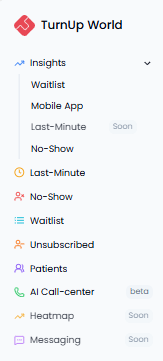
A user has limited access and cannot view all parts of TurnUp.
Users do not have access to:
-
Insights > Manager
-
Agenda
-
Treatments
-
Organisation
-
Integrations
This role is ideal for doctors and front desk staff.
🔐 How do you set this up?
You can easily manage user roles in TurnUp:
-
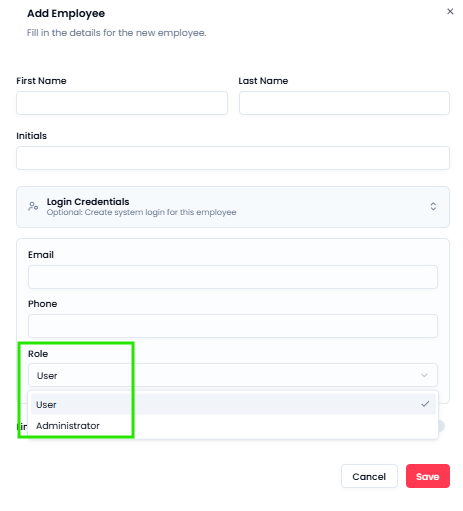
Go to Organisation > Employees
-
You will see an overview of all staff members and their current role
-
Add a new staff member or edit an existing staff member
-
Select the correct user type (administrator or user)
✅ What does this mean for your practice?
-
Increased security and control over sensitive information
-
Reduced risk of unwanted changes
-
Roles aligned with responsibilities within the team