![MicrosoftTeams-image (28).png]](https://27075283.hs-sites-eu1.com/hs-fs/hubfs/MicrosoftTeams-image%20(28).png?width=85&height=85&name=MicrosoftTeams-image%20(28).png)
⚙️How does it work?
Step 1: Open the TurnUp World application
- Go to TurnUp World and log in using your personal account credentials.
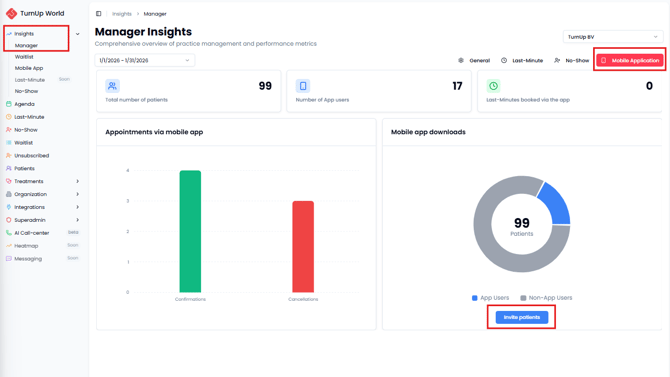
- Navigate to the General tab in the Insights module.
Step 2: Invite patients to download the mobile app
- Click on Mobile Application at the top of the page.
- Click Invite patients to send an invitation to download the TurnUp app.
- Patients receive an email invitation and can easily install and start using the app.
💡Tips
- Send a short, personal message from your practice’s email address before sending the invitation, so patients know what to expect.
- After sending the invitations, monitor which patients have accepted and activated the app.
✅Benefits
Mobile app users are notified of last-minute appointments slightly earlier and can confirm bookings faster thanks to saved personal details. This helps last-minute appointments get filled more quickly.