![MicrosoftTeams-image (28).png]](https://27075283.hs-sites-eu1.com/hs-fs/hubfs/MicrosoftTeams-image%20(28).png?width=85&height=85&name=MicrosoftTeams-image%20(28).png)
⚙️ How does it work?
Step 1: Open TurnUp World
- Go to TurnUp World and log in using your personal account credentials.
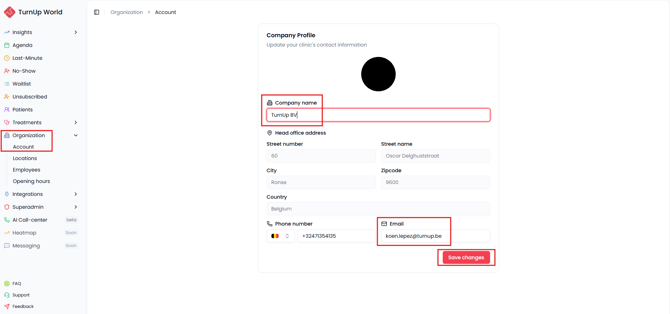
- Navigate to the Account tab within the Organization module.
Step 2: Review and update your company details
You can review and update the following information:
- Company name
This is the name patients will see in notifications related to the waitlist, last-minute appointments, and other communications. Make sure it is written exactly as you want it to appear. - Head office address
This address appears in communication sent to your patients. Make sure it is correct so patients know exactly where to go. - Phone number
The phone number patients can call to reach your practice. - Email address
All TurnUp communication (such as last-minute bookings, system notifications, and error messages) will be sent to this email address. Make sure this is an address your team checks multiple times a day.
Step 3: Save your changes
✅ Why is this important?
- Patients recognize your practice more easily in notifications.
- Communication remains clear and professional.
- Important messages about bookings or issues are not missed.